
January 30, 2026
January 30, 2026
Car Dealership Website Inventory Structure
A car dealership website inventory must help visitors find relevant vehicles without confusion or effort. This guide explains how to structure pages so buyers browse and compare cars clearly online.


Why Inventory Structure Matters
The inventory is the core of any car dealership website, where most visitors spend time and make decisions. When inventory pages are poorly organized, users feel lost even if the dealership has good cars and competitive prices, because they cannot see how many vehicles are available, how to narrow choices, or where to start. A clear inventory structure removes this friction by guiding visitors through the selection process, presenting vehicles in a logical and predictable order instead of forcing manual search or endless scrolling.
A well structured inventory also builds trust. When information is easy to scan and pages feel organized, the dealership appears professional and reliable. Buyers associate clarity with seriousness, especially when making a purchase like a car. The goal of inventory structure is not to impress visually but to reduce hesitation and help visitors move forward naturally.
Inventory Pages vs Vehicle Pages
Inventory pages and vehicle detail pages serve different purposes and should never be mixed. The inventory page is designed for browsing and comparison. It answers broad questions such as what types of vehicles are available, how many options exist, and which cars fit basic needs. This page should focus on overview information like model, year, mileage, transmission, and a clear visual preview.
Vehicle detail pages exist for evaluation. Once a user clicks on a specific car, they expect deeper information and confirmation. This includes full specifications, photos, condition details, and next steps. When these two page types are not clearly separated, users become confused. A strong inventory structure clearly positions the inventory page as a selection tool and the vehicle page as a decision page, with a clean and logical transition between them.
Category Based Browsing
Vehicle categories help users orient themselves immediately. Many buyers start with a general idea such as SUV, sedan, or truck rather than a specific model. Category based browsing supports this behavior by letting visitors enter the inventory through familiar vehicle types. This reduces mental effort and makes the selection process feel simpler and more comfortable from the first interaction.
A good category section is visible and easy to understand. Each category leads to a filtered inventory view that shows only relevant vehicles, without forcing users to set filters manually. This approach works well for both first time visitors and returning users across different devices. It also creates clear internal structure, which helps search engines understand how inventory content is organized across the site.
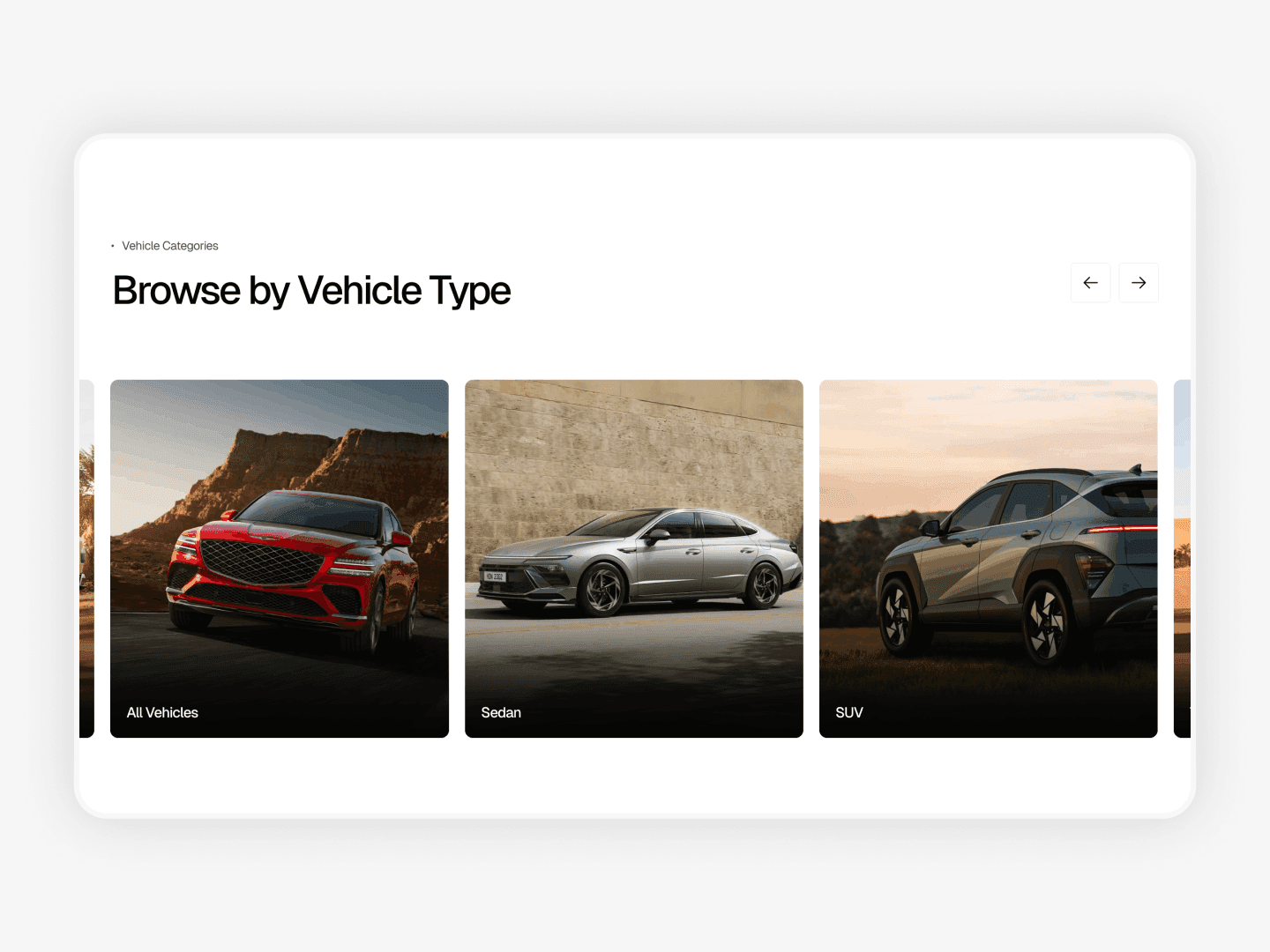
Example of a car dealership website with category based browsing: https://drivehub-template.framer.website
Filters as Navigation
Filters are not just an extra feature. They are a core navigation tool inside the inventory. Once users enter a category or view all vehicles, filters allow them to refine results without losing context. Common filters such as vehicle type, brand, condition, transmission, mileage, and price help buyers narrow options step by step.
The key is simplicity. Filters should be visible, easy to use, and limited to what actually helps decision making. When filters are overloaded or hidden, users either ignore them or feel overwhelmed. A clear filter layout turns a large inventory into a manageable list and gives visitors a sense of control. This makes browsing feel faster and more comfortable, especially on larger dealership websites.
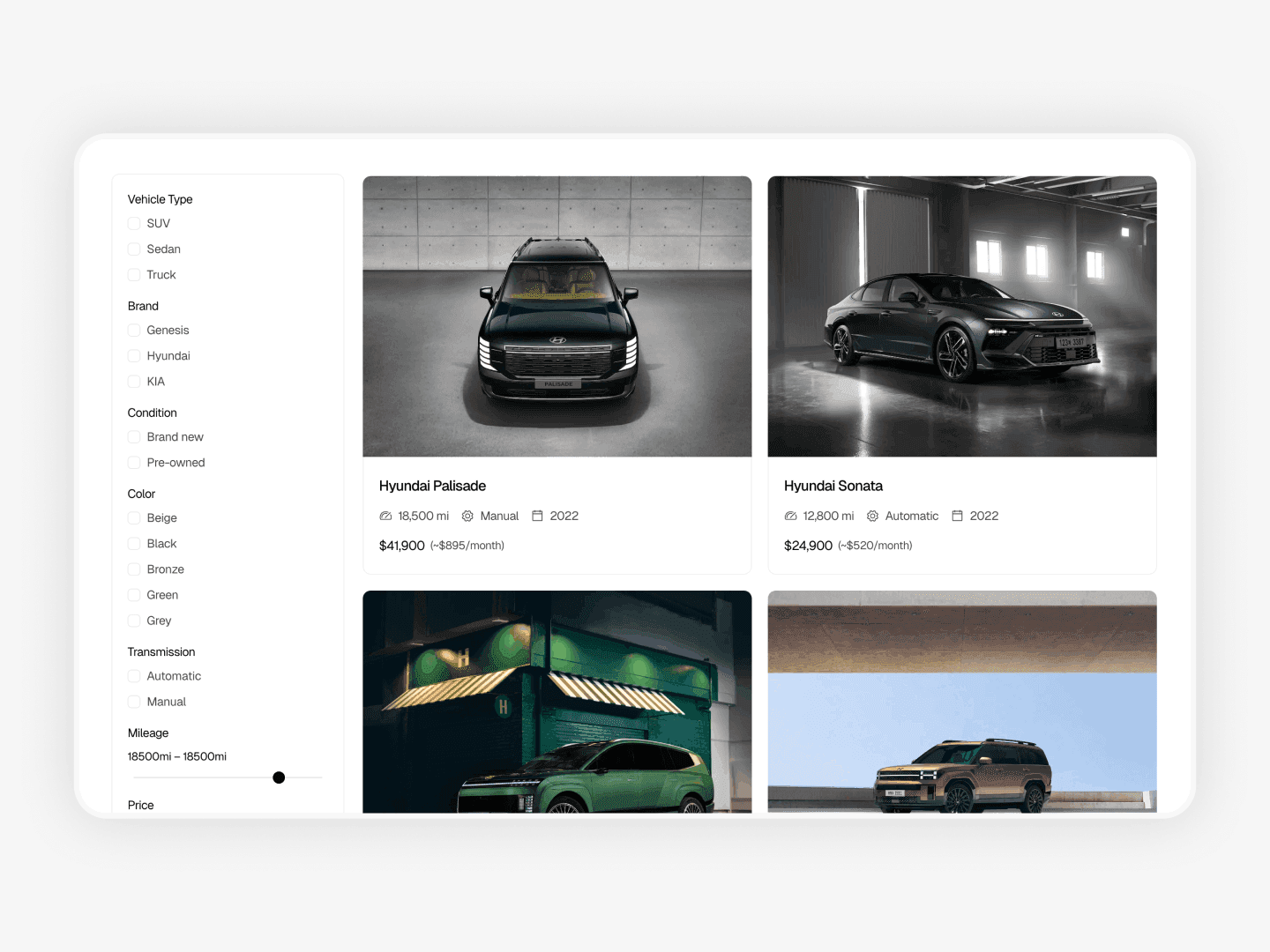
Example of a car dealership website with inventory filtering: https://drivehub-template.framer.website
Common Structure Mistakes
Many of the issues described in Common Car Dealership Website Mistakes are related to inventory structure. A common problem is treating the inventory as a list instead of a system. Endless grids without clear categories or filters force visitors to work and make browsing tiring. Another frequent issue is placing promotional banners or unrelated sections inside inventory pages, which breaks focus and distracts users from comparing vehicles.
Inconsistent vehicle cards, missing key details, or unclear sorting options also reduce usability and make comparison harder. When buyers cannot easily compare cars, confidence drops and hesitation increases. Some websites rely too heavily on search fields and assume users know exactly what they want, even though many are still exploring. A strong inventory structure supports both exploration and focused search without forcing a single behavior.
Conclusion
A car dealership website inventory should function as a clear system, not a collection of listings. When categories, filters, and page roles are structured properly, buyers feel confident and in control. This clarity reduces hesitation, increases engagement, and supports better conversion over time. A clean inventory structure does not need complexity to work. It needs logic, consistency, and respect for how people actually choose cars online.
Why Inventory Structure Matters
The inventory is the core of any car dealership website, where most visitors spend time and make decisions. When inventory pages are poorly organized, users feel lost even if the dealership has good cars and competitive prices, because they cannot see how many vehicles are available, how to narrow choices, or where to start. A clear inventory structure removes this friction by guiding visitors through the selection process, presenting vehicles in a logical and predictable order instead of forcing manual search or endless scrolling.
A well structured inventory also builds trust. When information is easy to scan and pages feel organized, the dealership appears professional and reliable. Buyers associate clarity with seriousness, especially when making a purchase like a car. The goal of inventory structure is not to impress visually but to reduce hesitation and help visitors move forward naturally.
Inventory Pages vs Vehicle Pages
Inventory pages and vehicle detail pages serve different purposes and should never be mixed. The inventory page is designed for browsing and comparison. It answers broad questions such as what types of vehicles are available, how many options exist, and which cars fit basic needs. This page should focus on overview information like model, year, mileage, transmission, and a clear visual preview.
Vehicle detail pages exist for evaluation. Once a user clicks on a specific car, they expect deeper information and confirmation. This includes full specifications, photos, condition details, and next steps. When these two page types are not clearly separated, users become confused. A strong inventory structure clearly positions the inventory page as a selection tool and the vehicle page as a decision page, with a clean and logical transition between them.
Category Based Browsing
Vehicle categories help users orient themselves immediately. Many buyers start with a general idea such as SUV, sedan, or truck rather than a specific model. Category based browsing supports this behavior by letting visitors enter the inventory through familiar vehicle types. This reduces mental effort and makes the selection process feel simpler and more comfortable from the first interaction.
A good category section is visible and easy to understand. Each category leads to a filtered inventory view that shows only relevant vehicles, without forcing users to set filters manually. This approach works well for both first time visitors and returning users across different devices. It also creates clear internal structure, which helps search engines understand how inventory content is organized across the site.

Example of a car dealership website with category based browsing: https://drivehub-template.framer.website
Filters as Navigation
Filters are not just an extra feature. They are a core navigation tool inside the inventory. Once users enter a category or view all vehicles, filters allow them to refine results without losing context. Common filters such as vehicle type, brand, condition, transmission, mileage, and price help buyers narrow options step by step.
The key is simplicity. Filters should be visible, easy to use, and limited to what actually helps decision making. When filters are overloaded or hidden, users either ignore them or feel overwhelmed. A clear filter layout turns a large inventory into a manageable list and gives visitors a sense of control. This makes browsing feel faster and more comfortable, especially on larger dealership websites.

Example of a car dealership website with inventory filtering: https://drivehub-template.framer.website
Common Structure Mistakes
Many of the issues described in Common Car Dealership Website Mistakes are related to inventory structure. A common problem is treating the inventory as a list instead of a system. Endless grids without clear categories or filters force visitors to work and make browsing tiring. Another frequent issue is placing promotional banners or unrelated sections inside inventory pages, which breaks focus and distracts users from comparing vehicles.
Inconsistent vehicle cards, missing key details, or unclear sorting options also reduce usability and make comparison harder. When buyers cannot easily compare cars, confidence drops and hesitation increases. Some websites rely too heavily on search fields and assume users know exactly what they want, even though many are still exploring. A strong inventory structure supports both exploration and focused search without forcing a single behavior.
Conclusion
A car dealership website inventory should function as a clear system, not a collection of listings. When categories, filters, and page roles are structured properly, buyers feel confident and in control. This clarity reduces hesitation, increases engagement, and supports better conversion over time. A clean inventory structure does not need complexity to work. It needs logic, consistency, and respect for how people actually choose cars online.
Why Inventory Structure Matters
The inventory is the core of any car dealership website, where most visitors spend time and make decisions. When inventory pages are poorly organized, users feel lost even if the dealership has good cars and competitive prices, because they cannot see how many vehicles are available, how to narrow choices, or where to start. A clear inventory structure removes this friction by guiding visitors through the selection process, presenting vehicles in a logical and predictable order instead of forcing manual search or endless scrolling.
A well structured inventory also builds trust. When information is easy to scan and pages feel organized, the dealership appears professional and reliable. Buyers associate clarity with seriousness, especially when making a purchase like a car. The goal of inventory structure is not to impress visually but to reduce hesitation and help visitors move forward naturally.
Inventory Pages vs Vehicle Pages
Inventory pages and vehicle detail pages serve different purposes and should never be mixed. The inventory page is designed for browsing and comparison. It answers broad questions such as what types of vehicles are available, how many options exist, and which cars fit basic needs. This page should focus on overview information like model, year, mileage, transmission, and a clear visual preview.
Vehicle detail pages exist for evaluation. Once a user clicks on a specific car, they expect deeper information and confirmation. This includes full specifications, photos, condition details, and next steps. When these two page types are not clearly separated, users become confused. A strong inventory structure clearly positions the inventory page as a selection tool and the vehicle page as a decision page, with a clean and logical transition between them.
Category Based Browsing
Vehicle categories help users orient themselves immediately. Many buyers start with a general idea such as SUV, sedan, or truck rather than a specific model. Category based browsing supports this behavior by letting visitors enter the inventory through familiar vehicle types. This reduces mental effort and makes the selection process feel simpler and more comfortable from the first interaction.
A good category section is visible and easy to understand. Each category leads to a filtered inventory view that shows only relevant vehicles, without forcing users to set filters manually. This approach works well for both first time visitors and returning users across different devices. It also creates clear internal structure, which helps search engines understand how inventory content is organized across the site.

Example of a car dealership website with category based browsing: https://drivehub-template.framer.website
Filters as Navigation
Filters are not just an extra feature. They are a core navigation tool inside the inventory. Once users enter a category or view all vehicles, filters allow them to refine results without losing context. Common filters such as vehicle type, brand, condition, transmission, mileage, and price help buyers narrow options step by step.
The key is simplicity. Filters should be visible, easy to use, and limited to what actually helps decision making. When filters are overloaded or hidden, users either ignore them or feel overwhelmed. A clear filter layout turns a large inventory into a manageable list and gives visitors a sense of control. This makes browsing feel faster and more comfortable, especially on larger dealership websites.

Example of a car dealership website with inventory filtering: https://drivehub-template.framer.website
Common Structure Mistakes
Many of the issues described in Common Car Dealership Website Mistakes are related to inventory structure. A common problem is treating the inventory as a list instead of a system. Endless grids without clear categories or filters force visitors to work and make browsing tiring. Another frequent issue is placing promotional banners or unrelated sections inside inventory pages, which breaks focus and distracts users from comparing vehicles.
Inconsistent vehicle cards, missing key details, or unclear sorting options also reduce usability and make comparison harder. When buyers cannot easily compare cars, confidence drops and hesitation increases. Some websites rely too heavily on search fields and assume users know exactly what they want, even though many are still exploring. A strong inventory structure supports both exploration and focused search without forcing a single behavior.
Conclusion
A car dealership website inventory should function as a clear system, not a collection of listings. When categories, filters, and page roles are structured properly, buyers feel confident and in control. This clarity reduces hesitation, increases engagement, and supports better conversion over time. A clean inventory structure does not need complexity to work. It needs logic, consistency, and respect for how people actually choose cars online.
Frequently Asked Questions
What is a car dealership website inventory?
A car dealership website inventory is the section where all available vehicles are listed and organized clearly. It helps visitors browse cars, compare options, and understand what the dealership offers.
Why is inventory structure important for car dealerships?
Inventory structure is important because it helps visitors find vehicles faster and with less effort. A clear structure reduces confusion, builds trust, and keeps users engaged.
What should be shown on inventory pages?
Inventory pages should show an overview of vehicles, including model, year, mileage, transmission, and a visual preview. These pages are meant for browsing and comparison, not detailed evaluation.
How do filters improve a car dealership website?
Filters help users narrow down vehicles based on their needs, such as type or mileage. They make large inventories easier to browse and give visitors more control.
What is a car dealership website inventory?
A car dealership website inventory is the section where all available vehicles are listed and organized clearly. It helps visitors browse cars, compare options, and understand what the dealership offers.
Why is inventory structure important for car dealerships?
Inventory structure is important because it helps visitors find vehicles faster and with less effort. A clear structure reduces confusion, builds trust, and keeps users engaged.
What should be shown on inventory pages?
Inventory pages should show an overview of vehicles, including model, year, mileage, transmission, and a visual preview. These pages are meant for browsing and comparison, not detailed evaluation.
How do filters improve a car dealership website?
Filters help users narrow down vehicles based on their needs, such as type or mileage. They make large inventories easier to browse and give visitors more control.
What is a car dealership website inventory?
A car dealership website inventory is the section where all available vehicles are listed and organized clearly. It helps visitors browse cars, compare options, and understand what the dealership offers.
Why is inventory structure important for car dealerships?
Inventory structure is important because it helps visitors find vehicles faster and with less effort. A clear structure reduces confusion, builds trust, and keeps users engaged.
What should be shown on inventory pages?
Inventory pages should show an overview of vehicles, including model, year, mileage, transmission, and a visual preview. These pages are meant for browsing and comparison, not detailed evaluation.
How do filters improve a car dealership website?
Filters help users narrow down vehicles based on their needs, such as type or mileage. They make large inventories easier to browse and give visitors more control.