January 22, 2026

January 22, 2026

Car Dealership Website Structure That Converts

Car Dealership Website Structure That Converts

A car dealership website must present vehicles, pricing, and contact paths in a clear order. This guide explains how structure directly affects trust and lead conversion across the entire buying process.

A car dealership website must present vehicles, pricing, and contact paths in a clear order. This guide explains how structure directly affects trust and lead conversion across the entire buying process.

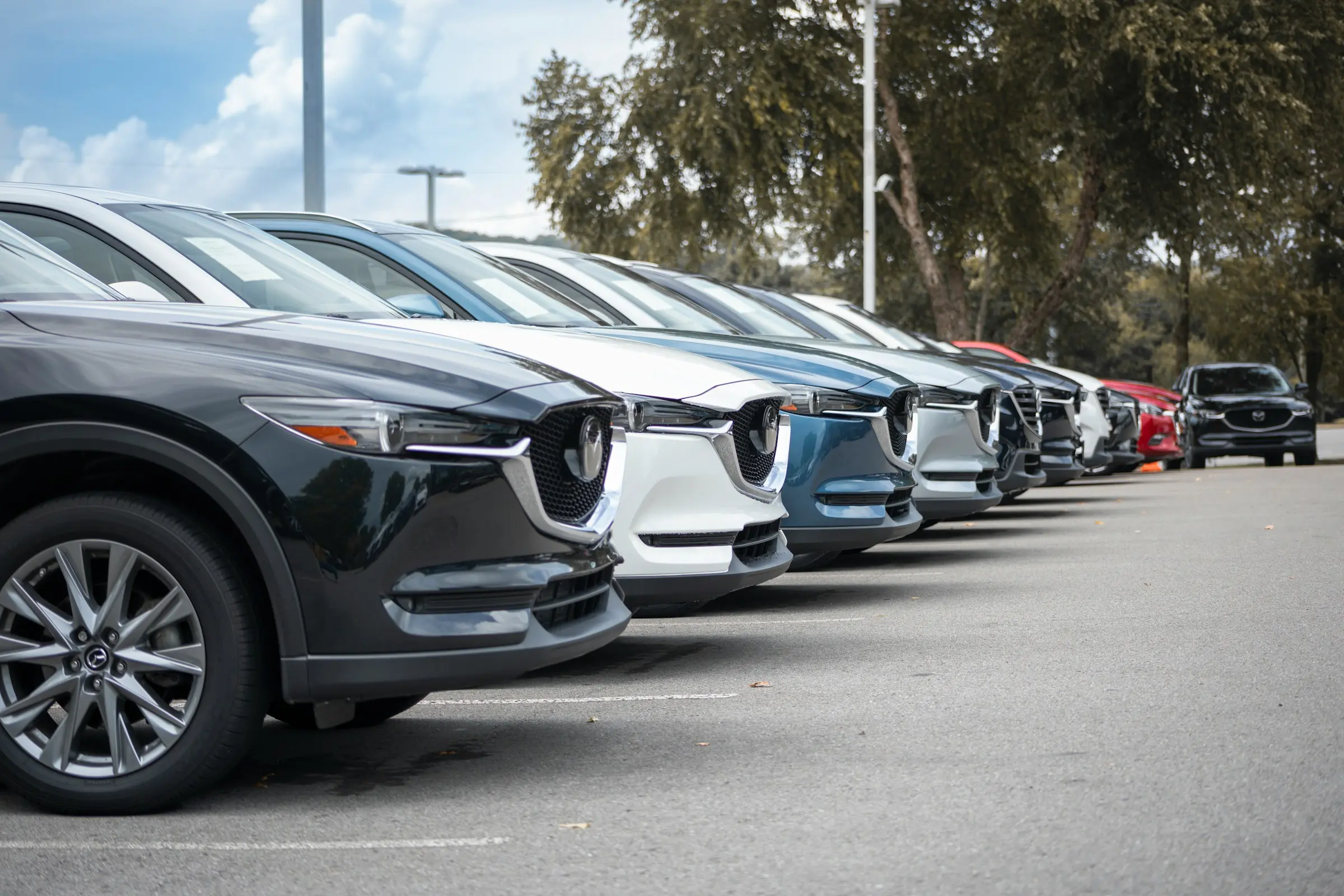
Row of new and pre-owned cars parked at a car dealership lot, showing organized vehicle inventory.

Structure Before Design

Many car dealership websites struggle to turn visitors into inquiries not because of vehicle quality or pricing, but because the website itself is difficult to understand. People visit a dealership website to browse available cars, compare options, and decide whether this business feels reliable enough to contact. When information is scattered, hard to find, or presented in the wrong order, visitors hesitate and leave without taking the next step.

A strong car dealership website is built around structure first, not visuals. Structure defines what information appears first, how pages are connected, and how easily visitors can move from browsing vehicles to contacting the dealer. When the website follows a clear and predictable order, visitors feel comfortable navigating it and can focus on choosing a car instead of figuring out how the website works.

How Visitors Think

Most people do not arrive at a car dealership website ready to call or send a message immediately. They usually want to explore inventory, understand pricing, review vehicle details, and get a sense of the dealership before making contact. A well structured website supports this process step by step instead of pushing visitors to act too early.

When information is presented in a logical sequence, visitors naturally move forward. First they browse vehicles, then they open individual listings, then they review details such as specifications or financing options. Only after this do contact actions feel natural and appropriate. This approach helps visitors feel confident and in control, which increases the likelihood of meaningful inquiries.

Page Order

The order of pages on a car dealership website plays a major role in how easy it is to use. The homepage should clearly guide visitors toward browsing vehicles without distractions or unnecessary content. From there, inventory pages help users explore available cars in an organized way, while vehicle detail pages provide the depth needed for informed decisions.

Supporting pages such as financing, trade in, and information about the dealership should be easy to access but should not interrupt the main journey. When pages are ordered clearly and each page has a specific role, the website feels structured and reliable. This predictability builds trust and encourages visitors to continue exploring.

Inventory Pages

Inventory pages are the core of any car dealership website. Visitors expect to see available vehicles quickly and without confusion. Clear categories, simple filters, and clean listings help users narrow down options without feeling overwhelmed.

Each vehicle card should show only the most important details, such as model, year, price, and mileage. This allows visitors to scan listings easily and decide which vehicles they want to explore further. A well organized inventory keeps users engaged longer and increases the number of vehicle pages they view.

Vehicle Pages

Vehicle detail pages are where most decisions take place. These pages should clearly present photos, specifications, pricing, and availability in a way that is easy to read and understand. Information should be grouped logically so visitors can find answers without unnecessary scrolling or confusion.

Contact options on vehicle pages should feel supportive rather than aggressive. When visitors have all the information they need, clear contact buttons help them take the next step with confidence. Well structured vehicle pages reduce uncertainty and make it easier for visitors to reach out.

Example of a Structured Dealership Website

Below is an example of a car dealership website built around the structure described above. The layout focuses on clear inventory navigation, well organized vehicle pages, and simple contact paths that feel natural at each step of the browsing process. Each page has a clear role, and nothing feels hidden or confusing.

This example shows how a dealership website can guide visitors from browsing vehicles to making contact without visual overload or unnecessary distractions. Inventory pages help users explore options easily, vehicle pages present all essential details in one place, and contact actions appear only after enough information has been provided to support confident decision making.
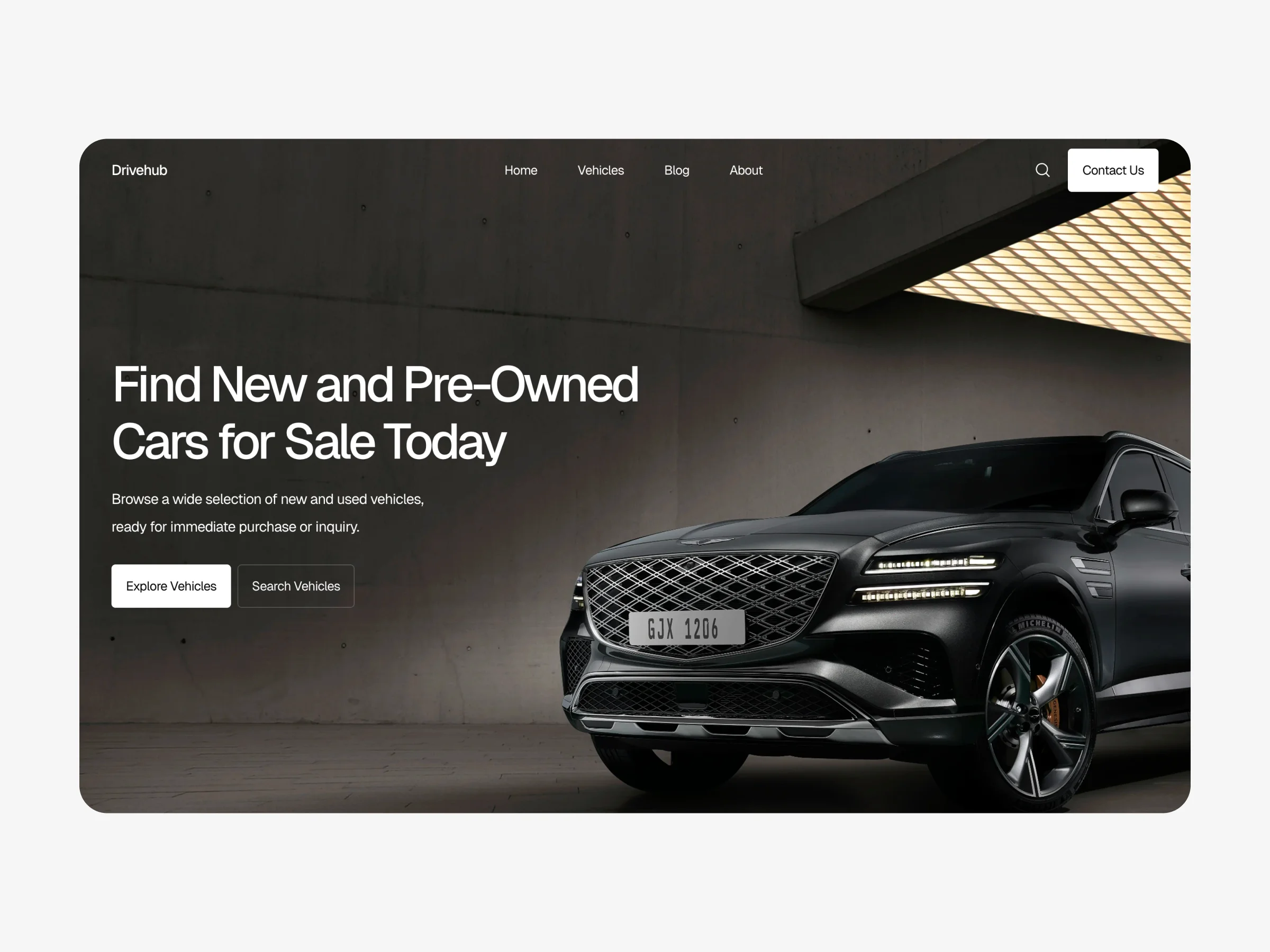

Car dealership website homepage with clear navigation, vehicle inventory access, and structured layout for browsing cars online.

View live example: https://drivehub-template.framer.website

Supporting Pages

Supporting pages such as financing, trade in, and information about the dealership help answer common questions and build confidence. These pages should be written clearly and structured simply so visitors can understand key details without effort.

When supporting pages are easy to find and easy to read, they strengthen the overall website experience. Visitors feel more informed and more comfortable reaching out, which improves both trust and inquiry quality.

Contact Access

Contact options should be visible throughout the website but never feel intrusive. Visitors should always know how to get in touch, but calls to action should appear naturally after enough information has been presented.

Simple contact forms, clear phone numbers, and consistent placement make it easier for visitors to take the next step when they are ready. Reducing friction at this stage helps turn interest into real conversations.

Conclusion

A car dealership website performs best when its structure reflects how people choose a car online. Clear page order, organized inventory, detailed vehicle pages, and supportive information help visitors move forward with confidence. When everything is easy to understand and easy to find, the website becomes a reliable tool that supports both buyers and the business.

Structure Before Design

Many car dealership websites struggle to turn visitors into inquiries not because of vehicle quality or pricing, but because the website itself is difficult to understand. People visit a dealership website to browse available cars, compare options, and decide whether this business feels reliable enough to contact. When information is scattered, hard to find, or presented in the wrong order, visitors hesitate and leave without taking the next step.

A strong car dealership website is built around structure first, not visuals. Structure defines what information appears first, how pages are connected, and how easily visitors can move from browsing vehicles to contacting the dealer. When the website follows a clear and predictable order, visitors feel comfortable navigating it and can focus on choosing a car instead of figuring out how the website works.

How Visitors Think

Most people do not arrive at a car dealership website ready to call or send a message immediately. They usually want to explore inventory, understand pricing, review vehicle details, and get a sense of the dealership before making contact. A well structured website supports this process step by step instead of pushing visitors to act too early.

When information is presented in a logical sequence, visitors naturally move forward. First they browse vehicles, then they open individual listings, then they review details such as specifications or financing options. Only after this do contact actions feel natural and appropriate. This approach helps visitors feel confident and in control, which increases the likelihood of meaningful inquiries.

Page Order

The order of pages on a car dealership website plays a major role in how easy it is to use. The homepage should clearly guide visitors toward browsing vehicles without distractions or unnecessary content. From there, inventory pages help users explore available cars in an organized way, while vehicle detail pages provide the depth needed for informed decisions.

Supporting pages such as financing, trade in, and information about the dealership should be easy to access but should not interrupt the main journey. When pages are ordered clearly and each page has a specific role, the website feels structured and reliable. This predictability builds trust and encourages visitors to continue exploring.

Inventory Pages

Inventory pages are the core of any car dealership website. Visitors expect to see available vehicles quickly and without confusion. Clear categories, simple filters, and clean listings help users narrow down options without feeling overwhelmed.

Each vehicle card should show only the most important details, such as model, year, price, and mileage. This allows visitors to scan listings easily and decide which vehicles they want to explore further. A well organized inventory keeps users engaged longer and increases the number of vehicle pages they view.

Vehicle Pages

Vehicle detail pages are where most decisions take place. These pages should clearly present photos, specifications, pricing, and availability in a way that is easy to read and understand. Information should be grouped logically so visitors can find answers without unnecessary scrolling or confusion.

Contact options on vehicle pages should feel supportive rather than aggressive. When visitors have all the information they need, clear contact buttons help them take the next step with confidence. Well structured vehicle pages reduce uncertainty and make it easier for visitors to reach out.

Example of a Structured Dealership Website

Below is an example of a car dealership website built around the structure described above. The layout focuses on clear inventory navigation, well organized vehicle pages, and simple contact paths that feel natural at each step of the browsing process. Each page has a clear role, and nothing feels hidden or confusing.

This example shows how a dealership website can guide visitors from browsing vehicles to making contact without visual overload or unnecessary distractions. Inventory pages help users explore options easily, vehicle pages present all essential details in one place, and contact actions appear only after enough information has been provided to support confident decision making.


Car dealership website homepage with clear navigation, vehicle inventory access, and structured layout for browsing cars online.

View live example: https://drivehub-template.framer.website

Supporting Pages

Supporting pages such as financing, trade in, and information about the dealership help answer common questions and build confidence. These pages should be written clearly and structured simply so visitors can understand key details without effort.

When supporting pages are easy to find and easy to read, they strengthen the overall website experience. Visitors feel more informed and more comfortable reaching out, which improves both trust and inquiry quality.

Contact Access

Contact options should be visible throughout the website but never feel intrusive. Visitors should always know how to get in touch, but calls to action should appear naturally after enough information has been presented.

Simple contact forms, clear phone numbers, and consistent placement make it easier for visitors to take the next step when they are ready. Reducing friction at this stage helps turn interest into real conversations.

Conclusion

A car dealership website performs best when its structure reflects how people choose a car online. Clear page order, organized inventory, detailed vehicle pages, and supportive information help visitors move forward with confidence. When everything is easy to understand and easy to find, the website becomes a reliable tool that supports both buyers and the business.

Structure Before Design

Many car dealership websites struggle to turn visitors into inquiries not because of vehicle quality or pricing, but because the website itself is difficult to understand. People visit a dealership website to browse available cars, compare options, and decide whether this business feels reliable enough to contact. When information is scattered, hard to find, or presented in the wrong order, visitors hesitate and leave without taking the next step.

A strong car dealership website is built around structure first, not visuals. Structure defines what information appears first, how pages are connected, and how easily visitors can move from browsing vehicles to contacting the dealer. When the website follows a clear and predictable order, visitors feel comfortable navigating it and can focus on choosing a car instead of figuring out how the website works.

How Visitors Think

Most people do not arrive at a car dealership website ready to call or send a message immediately. They usually want to explore inventory, understand pricing, review vehicle details, and get a sense of the dealership before making contact. A well structured website supports this process step by step instead of pushing visitors to act too early.

When information is presented in a logical sequence, visitors naturally move forward. First they browse vehicles, then they open individual listings, then they review details such as specifications or financing options. Only after this do contact actions feel natural and appropriate. This approach helps visitors feel confident and in control, which increases the likelihood of meaningful inquiries.

Page Order

The order of pages on a car dealership website plays a major role in how easy it is to use. The homepage should clearly guide visitors toward browsing vehicles without distractions or unnecessary content. From there, inventory pages help users explore available cars in an organized way, while vehicle detail pages provide the depth needed for informed decisions.

Supporting pages such as financing, trade in, and information about the dealership should be easy to access but should not interrupt the main journey. When pages are ordered clearly and each page has a specific role, the website feels structured and reliable. This predictability builds trust and encourages visitors to continue exploring.

Inventory Pages

Inventory pages are the core of any car dealership website. Visitors expect to see available vehicles quickly and without confusion. Clear categories, simple filters, and clean listings help users narrow down options without feeling overwhelmed.

Each vehicle card should show only the most important details, such as model, year, price, and mileage. This allows visitors to scan listings easily and decide which vehicles they want to explore further. A well organized inventory keeps users engaged longer and increases the number of vehicle pages they view.

Vehicle Pages

Vehicle detail pages are where most decisions take place. These pages should clearly present photos, specifications, pricing, and availability in a way that is easy to read and understand. Information should be grouped logically so visitors can find answers without unnecessary scrolling or confusion.

Contact options on vehicle pages should feel supportive rather than aggressive. When visitors have all the information they need, clear contact buttons help them take the next step with confidence. Well structured vehicle pages reduce uncertainty and make it easier for visitors to reach out.

Example of a Structured Dealership Website

Below is an example of a car dealership website built around the structure described above. The layout focuses on clear inventory navigation, well organized vehicle pages, and simple contact paths that feel natural at each step of the browsing process. Each page has a clear role, and nothing feels hidden or confusing.

This example shows how a dealership website can guide visitors from browsing vehicles to making contact without visual overload or unnecessary distractions. Inventory pages help users explore options easily, vehicle pages present all essential details in one place, and contact actions appear only after enough information has been provided to support confident decision making.


Car dealership website homepage with clear navigation, vehicle inventory access, and structured layout for browsing cars online.

View live example: https://drivehub-template.framer.website

Supporting Pages

Supporting pages such as financing, trade in, and information about the dealership help answer common questions and build confidence. These pages should be written clearly and structured simply so visitors can understand key details without effort.

When supporting pages are easy to find and easy to read, they strengthen the overall website experience. Visitors feel more informed and more comfortable reaching out, which improves both trust and inquiry quality.

Contact Access

Contact options should be visible throughout the website but never feel intrusive. Visitors should always know how to get in touch, but calls to action should appear naturally after enough information has been presented.

Simple contact forms, clear phone numbers, and consistent placement make it easier for visitors to take the next step when they are ready. Reducing friction at this stage helps turn interest into real conversations.

Conclusion

A car dealership website performs best when its structure reflects how people choose a car online. Clear page order, organized inventory, detailed vehicle pages, and supportive information help visitors move forward with confidence. When everything is easy to understand and easy to find, the website becomes a reliable tool that supports both buyers and the business.

Frequently Asked Questions

What pages does a car dealership website need?

A car dealership website needs a homepage, inventory pages, vehicle detail pages, supporting pages like financing or trade-in, and clear contact options.

Why is website structure important for car dealerships?

Clear structure helps visitors find vehicles easily, understand the website structure, and feel confident before contacting the dealership.

Where should contact buttons be placed on a website?

Contact options should appear naturally on vehicle pages and after key information, not too early in the browsing process.

How does inventory layout affect conversions?

A clear inventory layout helps visitors browse more vehicles, compare options, and stay engaged longer on the website.

What pages does a car dealership website need?

A car dealership website needs a homepage, inventory pages, vehicle detail pages, supporting pages like financing or trade-in, and clear contact options.

Why is website structure important for car dealerships?

Clear structure helps visitors find vehicles easily, understand the website structure, and feel confident before contacting the dealership.

Where should contact buttons be placed on a website?

Contact options should appear naturally on vehicle pages and after key information, not too early in the browsing process.

How does inventory layout affect conversions?

A clear inventory layout helps visitors browse more vehicles, compare options, and stay engaged longer on the website.

What pages does a car dealership website need?

A car dealership website needs a homepage, inventory pages, vehicle detail pages, supporting pages like financing or trade-in, and clear contact options.

Why is website structure important for car dealerships?

Clear structure helps visitors find vehicles easily, understand the website structure, and feel confident before contacting the dealership.

Where should contact buttons be placed on a website?

Contact options should appear naturally on vehicle pages and after key information, not too early in the browsing process.

How does inventory layout affect conversions?

A clear inventory layout helps visitors browse more vehicles, compare options, and stay engaged longer on the website.