
{ "@context": "https://schema.org", "@type": "FAQPage", "mainEntity": [ { "@type": "Question", "name": "Why is vehicle inventory navigation important?", "acceptedAnswer": { "@type": "Answer", "text": "Vehicle inventory navigation helps users understand available options and move through choices without confusion. When navigation is clear, users stay longer, compare vehicles more easily, and are more likely to contact the dealership." } }, { "@type": "Question", "name": "How do users browse vehicle inventory pages?", "acceptedAnswer": { "@type": "Answer", "text": "Most users start by scanning vehicles to understand prices and options, then narrow their choices using simple filters or sorting. Only after that do they compare specific vehicles and consider taking action." } }, { "@type": "Question", "name": "What makes inventory pages easier to navigate?", "acceptedAnswer": { "@type": "Answer", "text": "Consistent layouts, clear vehicle cards, predictable filters, and stable pagination make inventory pages easier to navigate. These elements reduce effort and help users focus on choosing vehicles instead of learning how the page works." } }, { "@type": "Question", "name": "How does inventory navigation affect leads?", "acceptedAnswer": { "@type": "Answer", "text": "Good inventory navigation builds trust and reduces frustration during browsing. When users feel confident and in control, they are more likely to continue exploring and submit an inquiry without unnecessary hesitation." } } ] }

January 31, 2026

January 31, 2026

How Users Navigate Vehicle Inventory Pages

How Users Navigate Vehicle Inventory Pages

Vehicle inventory is where most buying decisions start to take shape. This article explains how users move through inventory pages, narrow choices, and compare vehicles on a car dealership website.

Vehicle inventory is where most buying decisions start to take shape. This article explains how users move through inventory pages, narrow choices, and compare vehicles on a car dealership website.

White SUV driving on a desert road

First view of the inventory

When users open the inventory page, they try to understand if the selection feels clear and manageable. They look at how many vehicles are available, how information is presented, and if the page feels calm or overwhelming. If the layout looks dense or chaotic, users feel pressure instead of control and leave without exploring further.

At this stage, users are not ready to make decisions or apply filters. They are orienting themselves. A clean layout with consistent vehicle cards, visible prices, and clear labels helps users feel comfortable continuing to browse and understand what the dealership offers.

Scanning before filtering

Most users scroll through several vehicles before interacting with filters or search. This scanning phase helps them build a rough understanding of price ranges, vehicle types, and overall quality. They compare options visually and mentally, even without clicking into individual vehicle pages.

If vehicle cards contain too much information or inconsistent layouts, scanning becomes tiring and confusing. Clear hierarchy inside each card allows users to process information quickly and move forward naturally instead of feeling overwhelmed.

Narrowing the selection

After scanning, users begin narrowing their choices. This usually starts with simple actions such as adjusting price range or selecting a vehicle type. At this point, users expect the inventory to respond clearly and predictably. Filters should help users reduce options step by step, not force them into sudden or confusing results.

A well structured inventory allows gradual narrowing. Users apply one filter, review the results, and then refine their selection further. This mirrors how people think and make decisions, reducing frustration and increasing confidence.

Using sorting and search

Sorting and search support users who already have clearer preferences. Sorting helps prioritize what matters most, such as lowest price or newest vehicles. Search helps users quickly check specific models or brands they already have in mind.

These tools should be easy to find but not dominate the interface. When sorting and search feel optional and simple, users feel in control of their browsing experience rather than pushed into a rigid flow from the first interaction.
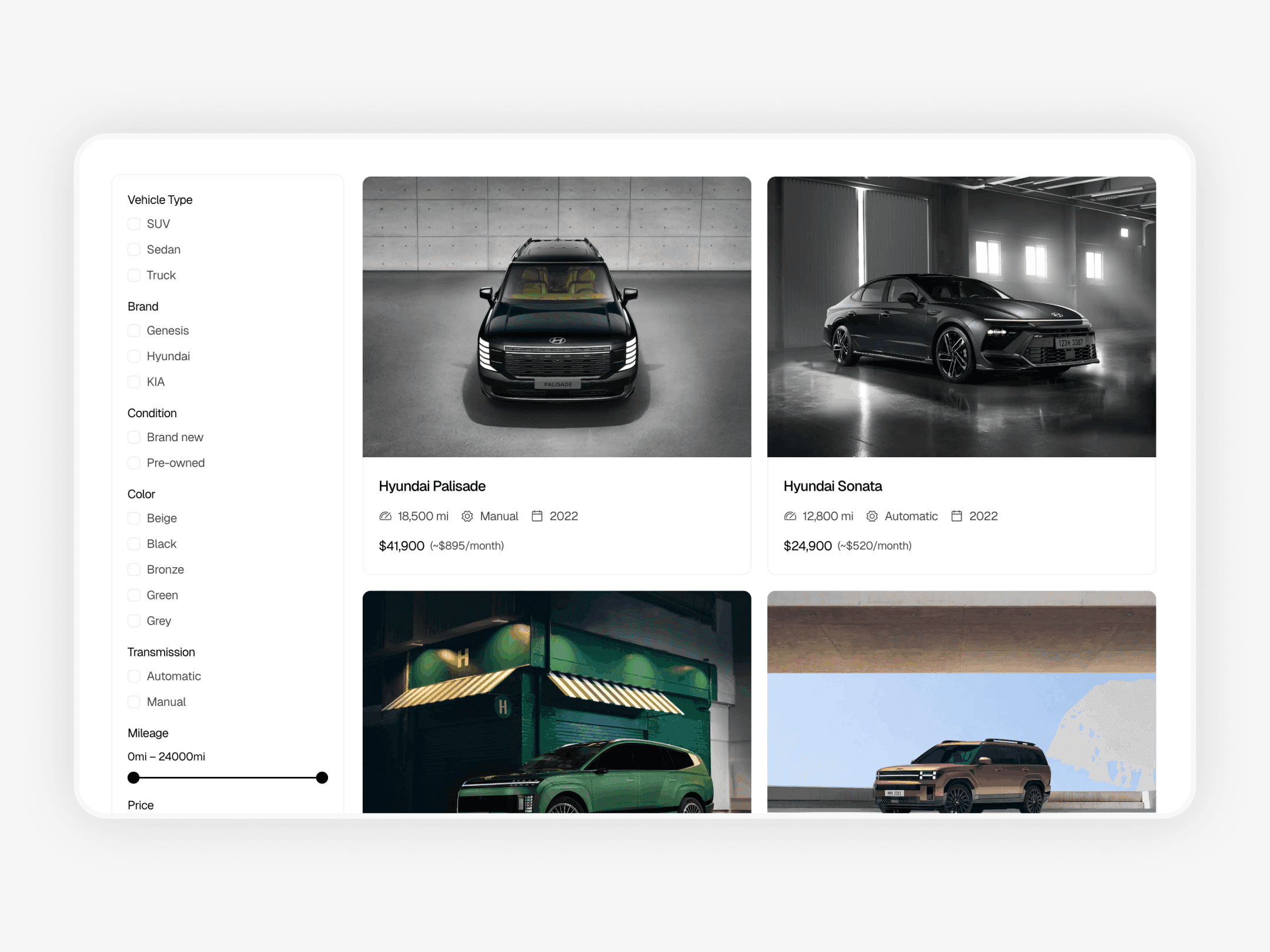

Car dealership website inventory page with vehicle filtering, sorting options, and grid layout for browsing available cars

Example of a car dealership website with inventory filtering: https://drivehub-template.framer.website

Comparing options

As the selection becomes smaller, comparison becomes the main activity. Users move between vehicle cards and detail pages, checking differences in price, condition, and specifications. Consistency plays a major role here. If information is missing or presented differently across vehicles, comparison becomes difficult and slows decision making.

A well structured inventory supports comparison by keeping structure and information consistent. This makes differences between vehicles easy to understand and helps users move to a decision with minimal effort required.

Handling empty results

Empty results often cause users to abandon inventory pages. When filters return no vehicles, users may assume the dealership does not have suitable options. A good inventory treats empty results as guidance, not a dead end, by explaining what happened and suggesting how to adjust the selection.

This keeps users engaged and encourages them to continue exploring instead of leaving the site altogether during the vehicle selection process.

Pagination and continuity

How vehicles load also affects navigation. Pagination or loading more vehicles should feel stable and predictable. Losing filter settings or jumping back to the top of the page breaks the browsing flow and frustrates users.

Continuity helps users stay focused on comparing vehicles instead of reorienting themselves. When navigation feels stable, users spend more time exploring the inventory.

Conclusion

Users navigate vehicle inventory in clear stages. They scan options, narrow choices, compare vehicles, and then decide whether to take action. This process works best when inventory pages feel calm, predictable, and easy to understand, allowing users to focus on choosing vehicles instead of figuring out how the page works.

Clear navigation is not about adding more features or complexity. It is about guiding users through choices with confidence and reducing unnecessary friction. If you want to understand how layout and page structure shape this experience from the first visit, you can also read Car Dealership Website Inventory Structure.

First view of the inventory

When users open the inventory page, they try to understand if the selection feels clear and manageable. They look at how many vehicles are available, how information is presented, and if the page feels calm or overwhelming. If the layout looks dense or chaotic, users feel pressure instead of control and leave without exploring further.

At this stage, users are not ready to make decisions or apply filters. They are orienting themselves. A clean layout with consistent vehicle cards, visible prices, and clear labels helps users feel comfortable continuing to browse and understand what the dealership offers.

Scanning before filtering

Most users scroll through several vehicles before interacting with filters or search. This scanning phase helps them build a rough understanding of price ranges, vehicle types, and overall quality. They compare options visually and mentally, even without clicking into individual vehicle pages.

If vehicle cards contain too much information or inconsistent layouts, scanning becomes tiring and confusing. Clear hierarchy inside each card allows users to process information quickly and move forward naturally instead of feeling overwhelmed.

Narrowing the selection

After scanning, users begin narrowing their choices. This usually starts with simple actions such as adjusting price range or selecting a vehicle type. At this point, users expect the inventory to respond clearly and predictably. Filters should help users reduce options step by step, not force them into sudden or confusing results.

A well structured inventory allows gradual narrowing. Users apply one filter, review the results, and then refine their selection further. This mirrors how people think and make decisions, reducing frustration and increasing confidence.

Using sorting and search

Sorting and search support users who already have clearer preferences. Sorting helps prioritize what matters most, such as lowest price or newest vehicles. Search helps users quickly check specific models or brands they already have in mind.

These tools should be easy to find but not dominate the interface. When sorting and search feel optional and simple, users feel in control of their browsing experience rather than pushed into a rigid flow from the first interaction.


Car dealership website inventory page with vehicle filtering, sorting options, and grid layout for browsing available cars

Example of a car dealership website with inventory filtering: https://drivehub-template.framer.website

Comparing options

As the selection becomes smaller, comparison becomes the main activity. Users move between vehicle cards and detail pages, checking differences in price, condition, and specifications. Consistency plays a major role here. If information is missing or presented differently across vehicles, comparison becomes difficult and slows decision making.

A well structured inventory supports comparison by keeping structure and information consistent. This makes differences between vehicles easy to understand and helps users move to a decision with minimal effort required.

Handling empty results

Empty results often cause users to abandon inventory pages. When filters return no vehicles, users may assume the dealership does not have suitable options. A good inventory treats empty results as guidance, not a dead end, by explaining what happened and suggesting how to adjust the selection.

This keeps users engaged and encourages them to continue exploring instead of leaving the site altogether during the vehicle selection process.

Pagination and continuity

How vehicles load also affects navigation. Pagination or loading more vehicles should feel stable and predictable. Losing filter settings or jumping back to the top of the page breaks the browsing flow and frustrates users.

Continuity helps users stay focused on comparing vehicles instead of reorienting themselves. When navigation feels stable, users spend more time exploring the inventory.

Conclusion

Users navigate vehicle inventory in clear stages. They scan options, narrow choices, compare vehicles, and then decide whether to take action. This process works best when inventory pages feel calm, predictable, and easy to understand, allowing users to focus on choosing vehicles instead of figuring out how the page works.

Clear navigation is not about adding more features or complexity. It is about guiding users through choices with confidence and reducing unnecessary friction. If you want to understand how layout and page structure shape this experience from the first visit, you can also read Car Dealership Website Inventory Structure.

First view of the inventory

When users open the inventory page, they try to understand if the selection feels clear and manageable. They look at how many vehicles are available, how information is presented, and if the page feels calm or overwhelming. If the layout looks dense or chaotic, users feel pressure instead of control and leave without exploring further.

At this stage, users are not ready to make decisions or apply filters. They are orienting themselves. A clean layout with consistent vehicle cards, visible prices, and clear labels helps users feel comfortable continuing to browse and understand what the dealership offers.

Scanning before filtering

Most users scroll through several vehicles before interacting with filters or search. This scanning phase helps them build a rough understanding of price ranges, vehicle types, and overall quality. They compare options visually and mentally, even without clicking into individual vehicle pages.

If vehicle cards contain too much information or inconsistent layouts, scanning becomes tiring and confusing. Clear hierarchy inside each card allows users to process information quickly and move forward naturally instead of feeling overwhelmed.

Narrowing the selection

After scanning, users begin narrowing their choices. This usually starts with simple actions such as adjusting price range or selecting a vehicle type. At this point, users expect the inventory to respond clearly and predictably. Filters should help users reduce options step by step, not force them into sudden or confusing results.

A well structured inventory allows gradual narrowing. Users apply one filter, review the results, and then refine their selection further. This mirrors how people think and make decisions, reducing frustration and increasing confidence.

Using sorting and search

Sorting and search support users who already have clearer preferences. Sorting helps prioritize what matters most, such as lowest price or newest vehicles. Search helps users quickly check specific models or brands they already have in mind.

These tools should be easy to find but not dominate the interface. When sorting and search feel optional and simple, users feel in control of their browsing experience rather than pushed into a rigid flow from the first interaction.


Car dealership website inventory page with vehicle filtering, sorting options, and grid layout for browsing available cars

Example of a car dealership website with inventory filtering: https://drivehub-template.framer.website

Comparing options

As the selection becomes smaller, comparison becomes the main activity. Users move between vehicle cards and detail pages, checking differences in price, condition, and specifications. Consistency plays a major role here. If information is missing or presented differently across vehicles, comparison becomes difficult and slows decision making.

A well structured inventory supports comparison by keeping structure and information consistent. This makes differences between vehicles easy to understand and helps users move to a decision with minimal effort required.

Handling empty results

Empty results often cause users to abandon inventory pages. When filters return no vehicles, users may assume the dealership does not have suitable options. A good inventory treats empty results as guidance, not a dead end, by explaining what happened and suggesting how to adjust the selection.

This keeps users engaged and encourages them to continue exploring instead of leaving the site altogether during the vehicle selection process.

Pagination and continuity

How vehicles load also affects navigation. Pagination or loading more vehicles should feel stable and predictable. Losing filter settings or jumping back to the top of the page breaks the browsing flow and frustrates users.

Continuity helps users stay focused on comparing vehicles instead of reorienting themselves. When navigation feels stable, users spend more time exploring the inventory.

Conclusion

Users navigate vehicle inventory in clear stages. They scan options, narrow choices, compare vehicles, and then decide whether to take action. This process works best when inventory pages feel calm, predictable, and easy to understand, allowing users to focus on choosing vehicles instead of figuring out how the page works.

Clear navigation is not about adding more features or complexity. It is about guiding users through choices with confidence and reducing unnecessary friction. If you want to understand how layout and page structure shape this experience from the first visit, you can also read Car Dealership Website Inventory Structure.

Frequently Asked Questions

Why is vehicle inventory navigation important?

Vehicle inventory navigation helps users understand available options and move through choices without confusion. When navigation is clear, users stay longer, compare vehicles more easily, and are more likely to contact the dealership.

How do users browse vehicle inventory pages?

Most users start by scanning vehicles to understand prices and options, then narrow their choices using simple filters or sorting. Only after that do they compare specific vehicles and consider taking action.

What makes inventory pages easier to navigate?

Consistent layouts, clear vehicle cards, predictable filters, and stable pagination make inventory pages easier to navigate. These elements reduce effort and help users focus on choosing vehicles instead of learning how the page works.

How does inventory navigation affect leads?

Good inventory navigation builds trust and reduces frustration during browsing. When users feel confident and in control, they are more likely to continue exploring and submit an inquiry without unnecessary hesitation.

Why is vehicle inventory navigation important?

Vehicle inventory navigation helps users understand available options and move through choices without confusion. When navigation is clear, users stay longer, compare vehicles more easily, and are more likely to contact the dealership.

How do users browse vehicle inventory pages?

Most users start by scanning vehicles to understand prices and options, then narrow their choices using simple filters or sorting. Only after that do they compare specific vehicles and consider taking action.

What makes inventory pages easier to navigate?

Consistent layouts, clear vehicle cards, predictable filters, and stable pagination make inventory pages easier to navigate. These elements reduce effort and help users focus on choosing vehicles instead of learning how the page works.

How does inventory navigation affect leads?

Good inventory navigation builds trust and reduces frustration during browsing. When users feel confident and in control, they are more likely to continue exploring and submit an inquiry without unnecessary hesitation.

Why is vehicle inventory navigation important?

Vehicle inventory navigation helps users understand available options and move through choices without confusion. When navigation is clear, users stay longer, compare vehicles more easily, and are more likely to contact the dealership.

How do users browse vehicle inventory pages?

Most users start by scanning vehicles to understand prices and options, then narrow their choices using simple filters or sorting. Only after that do they compare specific vehicles and consider taking action.

What makes inventory pages easier to navigate?

Consistent layouts, clear vehicle cards, predictable filters, and stable pagination make inventory pages easier to navigate. These elements reduce effort and help users focus on choosing vehicles instead of learning how the page works.

How does inventory navigation affect leads?

Good inventory navigation builds trust and reduces frustration during browsing. When users feel confident and in control, they are more likely to continue exploring and submit an inquiry without unnecessary hesitation.