
January 31, 2026
January 31, 2026
How Vehicle Category Pages Improve Inventory Navigation
Vehicle category pages help explore inventory and reduce overload. This article explains how pages improve navigation on car dealership inventory websites for better browsing decisions.


Why vehicle category pages matter
Vehicle category pages play an important role when inventory grows beyond a small list. When users are faced with many vehicles at once, browsing can quickly feel overwhelming. Category pages solve this problem by grouping vehicles into familiar sections that users already understand, such as SUVs, sedans, or trucks.
Instead of scanning the entire inventory, users can choose a category that matches their needs and immediately focus on a smaller, more relevant selection. This makes browsing feel intentional and controlled, rather than random or exhausting.
Categories versus filters
Categories and filters serve different purposes and should not replace each other. Filters help users narrow choices after they begin browsing, while categories help users decide where to start. Category pages act as an entry point that reduces complexity before any filtering happens and clarifies early browsing decisions.
When categories are clear, users arrive with better expectations. They understand what type of vehicles they are about to see and whether the page is relevant to them. This reduces frustration and makes filters feel like a refinement tool instead of a requirement.
How category pages guide users
Category pages guide users by setting context early. A clear headline, a short description, and a focused list of vehicles help users understand where they are and what they can expect. This clarity builds confidence and encourages further exploration instead of hesitation.
By entering a category page, users make an early decision that simplifies the rest of the browsing process. They feel progress instead of pressure, which keeps them engaged with the inventory and reduces decision fatigue.
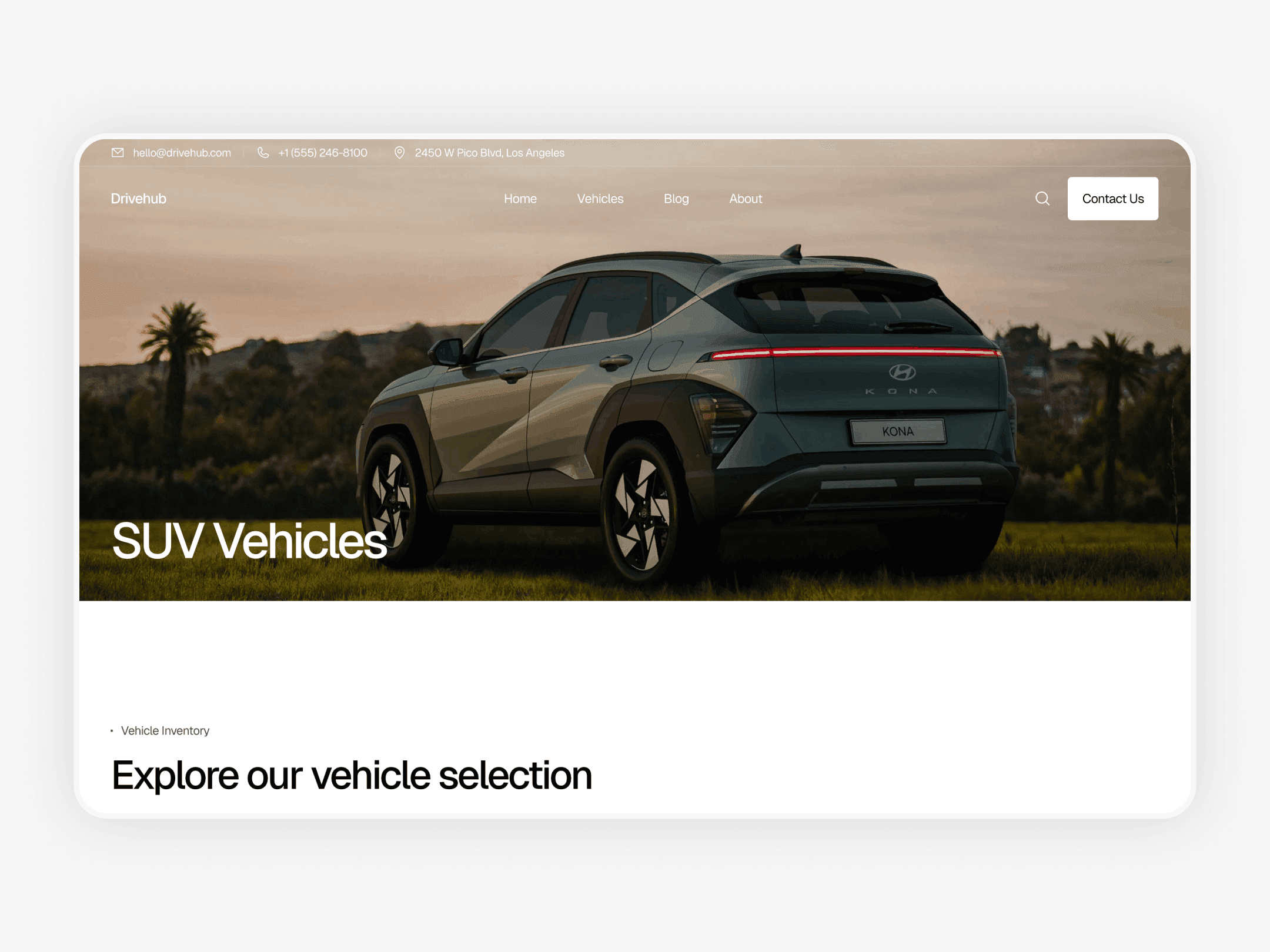
Example of a vehicle category page (SUV vehicles): https://drivehub-template.framer.website
What makes a strong category page
A strong category page is simple and focused. It clearly communicates the vehicle type, shows relevant listings, and avoids unnecessary distractions. The goal is not to repeat the entire inventory, but to present a curated subset that feels easier to browse.
Consistent vehicle cards, clear pricing, and predictable layouts are especially important on category pages. When structure stays consistent, users can scan and compare vehicles quickly without re-learning how the page works.
SEO value of category pages
Category pages also support visibility in search engines. Well structured category pages create clear entry points for users searching for specific vehicle types. These pages are easier to understand and index than large inventory pages with many mixed results.
When category pages have a clear purpose and consistent structure, they can attract users who already know what type of vehicle they want. This brings more qualified visitors into the inventory and improves overall navigation quality.
When category pages are not needed
Not every dealership needs category pages. When inventory is small, adding multiple category pages can create unnecessary complexity. In these cases, a single inventory page with simple filters may work better.
Category pages become valuable when inventory size or variety makes browsing difficult. They should be added to simplify navigation, not to add structure for its own sake.
How categories support better decisions
Category pages help users make better decisions by reducing choice early. When users focus on a specific vehicle type, comparison becomes easier and more meaningful. This leads to clearer preferences and faster progress toward inquiry or contact.
By narrowing the scope of browsing, category pages reduce mental effort and help users stay focused. This improves the overall experience and increases the likelihood of users continuing deeper into the site.
Conclusion
Vehicle category pages improve inventory navigation by giving users a clear starting point and reducing complexity early. They help users focus on relevant options, understand what they are browsing, and move through inventory with confidence instead of confusion.
Categories work best when they are simple, purposeful, and aligned with user expectations. To better understand how users move through inventory before reaching category pages, you can also read How Users Navigate Vehicle Inventory Pages.
Why vehicle category pages matter
Vehicle category pages play an important role when inventory grows beyond a small list. When users are faced with many vehicles at once, browsing can quickly feel overwhelming. Category pages solve this problem by grouping vehicles into familiar sections that users already understand, such as SUVs, sedans, or trucks.
Instead of scanning the entire inventory, users can choose a category that matches their needs and immediately focus on a smaller, more relevant selection. This makes browsing feel intentional and controlled, rather than random or exhausting.
Categories versus filters
Categories and filters serve different purposes and should not replace each other. Filters help users narrow choices after they begin browsing, while categories help users decide where to start. Category pages act as an entry point that reduces complexity before any filtering happens and clarifies early browsing decisions.
When categories are clear, users arrive with better expectations. They understand what type of vehicles they are about to see and whether the page is relevant to them. This reduces frustration and makes filters feel like a refinement tool instead of a requirement.
How category pages guide users
Category pages guide users by setting context early. A clear headline, a short description, and a focused list of vehicles help users understand where they are and what they can expect. This clarity builds confidence and encourages further exploration instead of hesitation.
By entering a category page, users make an early decision that simplifies the rest of the browsing process. They feel progress instead of pressure, which keeps them engaged with the inventory and reduces decision fatigue.

Example of a vehicle category page (SUV vehicles): https://drivehub-template.framer.website
What makes a strong category page
A strong category page is simple and focused. It clearly communicates the vehicle type, shows relevant listings, and avoids unnecessary distractions. The goal is not to repeat the entire inventory, but to present a curated subset that feels easier to browse.
Consistent vehicle cards, clear pricing, and predictable layouts are especially important on category pages. When structure stays consistent, users can scan and compare vehicles quickly without re-learning how the page works.
SEO value of category pages
Category pages also support visibility in search engines. Well structured category pages create clear entry points for users searching for specific vehicle types. These pages are easier to understand and index than large inventory pages with many mixed results.
When category pages have a clear purpose and consistent structure, they can attract users who already know what type of vehicle they want. This brings more qualified visitors into the inventory and improves overall navigation quality.
When category pages are not needed
Not every dealership needs category pages. When inventory is small, adding multiple category pages can create unnecessary complexity. In these cases, a single inventory page with simple filters may work better.
Category pages become valuable when inventory size or variety makes browsing difficult. They should be added to simplify navigation, not to add structure for its own sake.
How categories support better decisions
Category pages help users make better decisions by reducing choice early. When users focus on a specific vehicle type, comparison becomes easier and more meaningful. This leads to clearer preferences and faster progress toward inquiry or contact.
By narrowing the scope of browsing, category pages reduce mental effort and help users stay focused. This improves the overall experience and increases the likelihood of users continuing deeper into the site.
Conclusion
Vehicle category pages improve inventory navigation by giving users a clear starting point and reducing complexity early. They help users focus on relevant options, understand what they are browsing, and move through inventory with confidence instead of confusion.
Categories work best when they are simple, purposeful, and aligned with user expectations. To better understand how users move through inventory before reaching category pages, you can also read How Users Navigate Vehicle Inventory Pages.
Why vehicle category pages matter
Vehicle category pages play an important role when inventory grows beyond a small list. When users are faced with many vehicles at once, browsing can quickly feel overwhelming. Category pages solve this problem by grouping vehicles into familiar sections that users already understand, such as SUVs, sedans, or trucks.
Instead of scanning the entire inventory, users can choose a category that matches their needs and immediately focus on a smaller, more relevant selection. This makes browsing feel intentional and controlled, rather than random or exhausting.
Categories versus filters
Categories and filters serve different purposes and should not replace each other. Filters help users narrow choices after they begin browsing, while categories help users decide where to start. Category pages act as an entry point that reduces complexity before any filtering happens and clarifies early browsing decisions.
When categories are clear, users arrive with better expectations. They understand what type of vehicles they are about to see and whether the page is relevant to them. This reduces frustration and makes filters feel like a refinement tool instead of a requirement.
How category pages guide users
Category pages guide users by setting context early. A clear headline, a short description, and a focused list of vehicles help users understand where they are and what they can expect. This clarity builds confidence and encourages further exploration instead of hesitation.
By entering a category page, users make an early decision that simplifies the rest of the browsing process. They feel progress instead of pressure, which keeps them engaged with the inventory and reduces decision fatigue.

Example of a vehicle category page (SUV vehicles): https://drivehub-template.framer.website
What makes a strong category page
A strong category page is simple and focused. It clearly communicates the vehicle type, shows relevant listings, and avoids unnecessary distractions. The goal is not to repeat the entire inventory, but to present a curated subset that feels easier to browse.
Consistent vehicle cards, clear pricing, and predictable layouts are especially important on category pages. When structure stays consistent, users can scan and compare vehicles quickly without re-learning how the page works.
SEO value of category pages
Category pages also support visibility in search engines. Well structured category pages create clear entry points for users searching for specific vehicle types. These pages are easier to understand and index than large inventory pages with many mixed results.
When category pages have a clear purpose and consistent structure, they can attract users who already know what type of vehicle they want. This brings more qualified visitors into the inventory and improves overall navigation quality.
When category pages are not needed
Not every dealership needs category pages. When inventory is small, adding multiple category pages can create unnecessary complexity. In these cases, a single inventory page with simple filters may work better.
Category pages become valuable when inventory size or variety makes browsing difficult. They should be added to simplify navigation, not to add structure for its own sake.
How categories support better decisions
Category pages help users make better decisions by reducing choice early. When users focus on a specific vehicle type, comparison becomes easier and more meaningful. This leads to clearer preferences and faster progress toward inquiry or contact.
By narrowing the scope of browsing, category pages reduce mental effort and help users stay focused. This improves the overall experience and increases the likelihood of users continuing deeper into the site.
Conclusion
Vehicle category pages improve inventory navigation by giving users a clear starting point and reducing complexity early. They help users focus on relevant options, understand what they are browsing, and move through inventory with confidence instead of confusion.
Categories work best when they are simple, purposeful, and aligned with user expectations. To better understand how users move through inventory before reaching category pages, you can also read How Users Navigate Vehicle Inventory Pages.
Frequently Asked Questions
Why are vehicle category pages important?
Vehicle category pages help users start browsing with a clearer focus. By grouping vehicles into familiar types, they reduce overload and make inventory easier to explore.
How are category pages different from filters?
Category pages help users decide where to start, while filters help narrow choices later. Categories reduce complexity early, and filters refine results after browsing begins.
When should a dealership use category pages?
Category pages are most useful when inventory is large or diverse. They help users avoid scanning the entire inventory and focus on relevant vehicle types.
How do category pages affect user decisions?
Category pages reduce choice early and make comparison easier. This helps users stay focused, feel progress, and move toward contact or inquiry more confidently.
Why are vehicle category pages important?
Vehicle category pages help users start browsing with a clearer focus. By grouping vehicles into familiar types, they reduce overload and make inventory easier to explore.
How are category pages different from filters?
Category pages help users decide where to start, while filters help narrow choices later. Categories reduce complexity early, and filters refine results after browsing begins.
When should a dealership use category pages?
Category pages are most useful when inventory is large or diverse. They help users avoid scanning the entire inventory and focus on relevant vehicle types.
How do category pages affect user decisions?
Category pages reduce choice early and make comparison easier. This helps users stay focused, feel progress, and move toward contact or inquiry more confidently.
Why are vehicle category pages important?
Vehicle category pages help users start browsing with a clearer focus. By grouping vehicles into familiar types, they reduce overload and make inventory easier to explore.
How are category pages different from filters?
Category pages help users decide where to start, while filters help narrow choices later. Categories reduce complexity early, and filters refine results after browsing begins.
When should a dealership use category pages?
Category pages are most useful when inventory is large or diverse. They help users avoid scanning the entire inventory and focus on relevant vehicle types.
How do category pages affect user decisions?
Category pages reduce choice early and make comparison easier. This helps users stay focused, feel progress, and move toward contact or inquiry more confidently.